
Why BigBear 为什么选大熊 Por qué BigBear
Tap any claim to see the proof. 点开任何一条,看看凭什么。 Toca cualquier afirmación para ver la prueba.
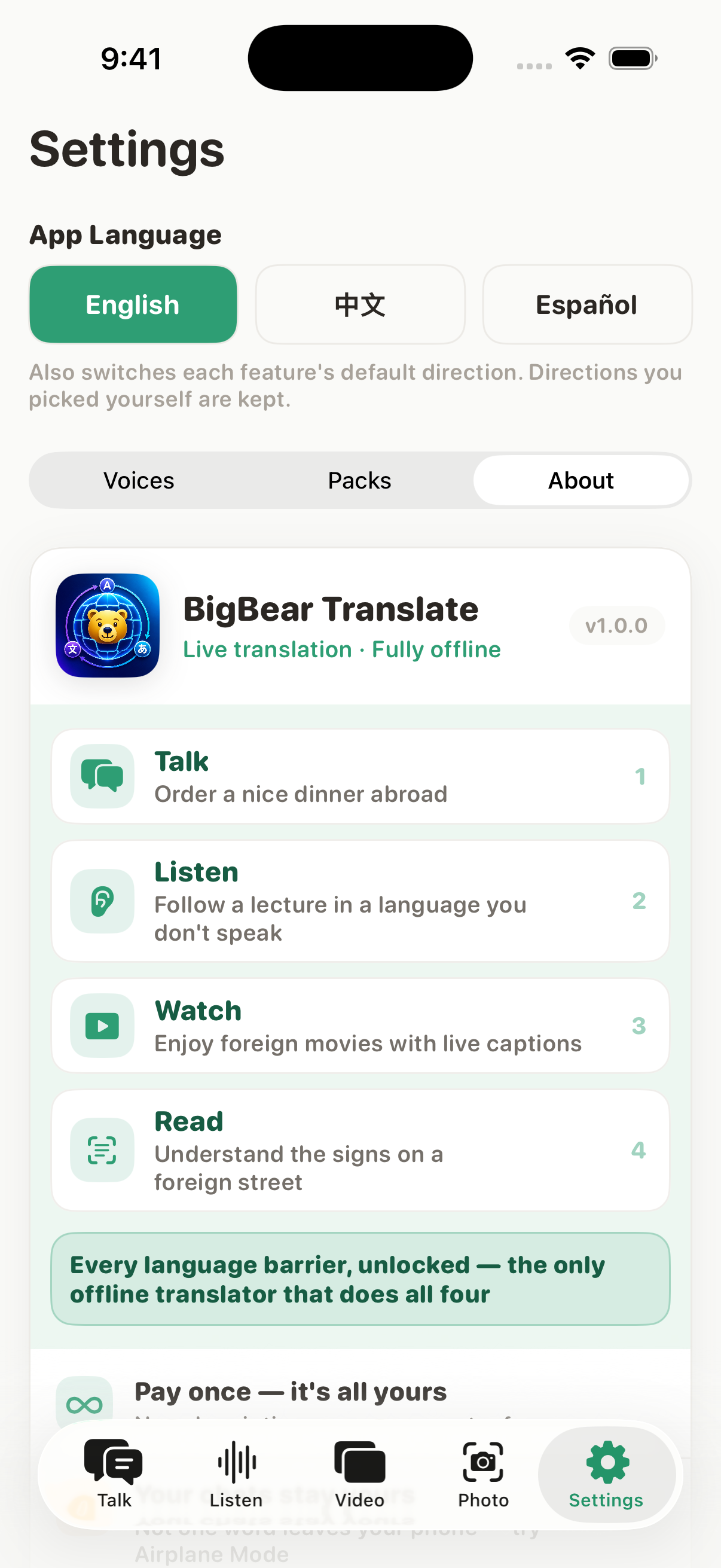
Four everyday situations, one app — and none of them need the internet. 四个最常见的场景,一个 App 全搞定 —— 而且全都不需要网络。 Cuatro situaciones cotidianas, una sola app, y ninguna necesita internet.
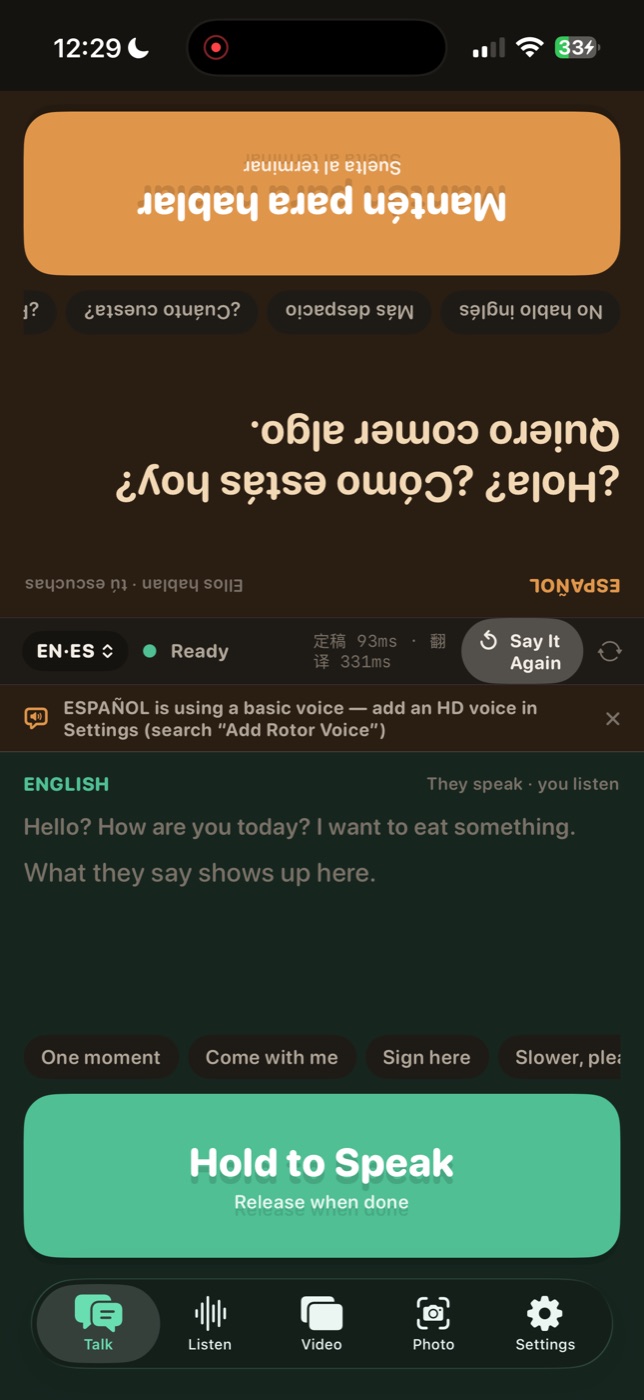
Talk
Order a nice dinner abroad 在国外从容点一顿好饭 Pide una buena cena en el extranjero
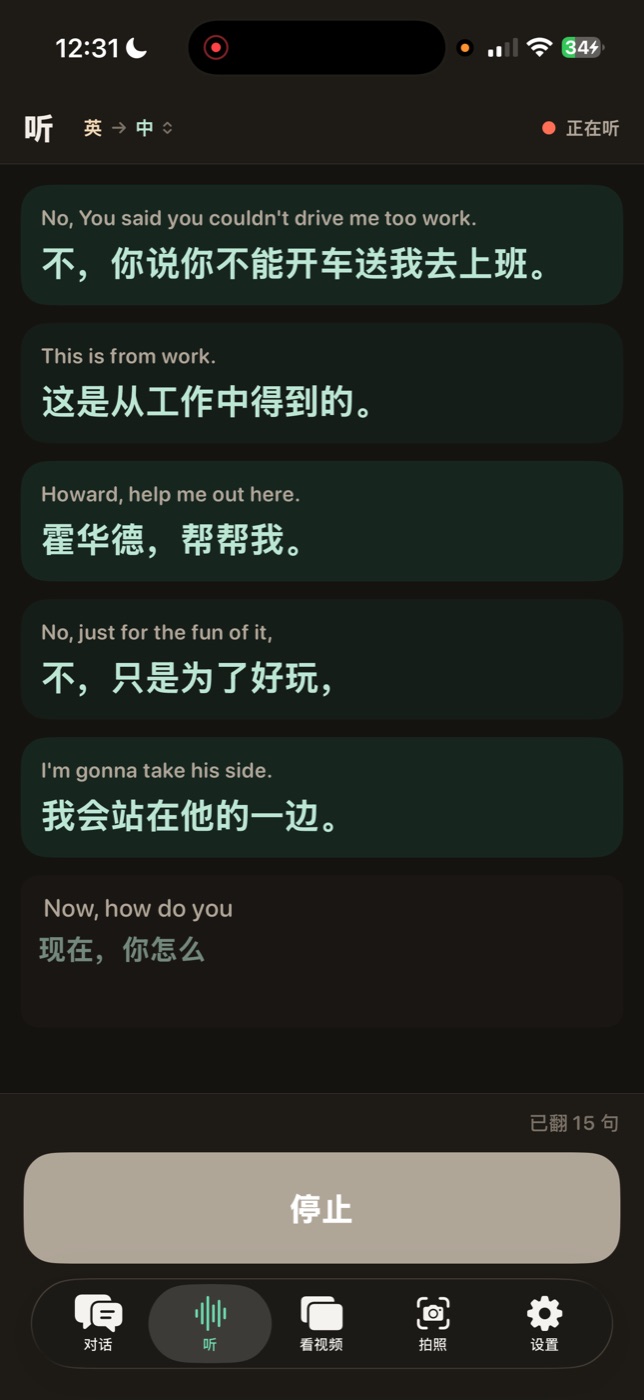
Listen
Follow a lecture in a language you don't speak 听懂陌生语言的讲座 Sigue una charla en un idioma que no hablas
Watch
Enjoy foreign movies with live captions 看外语视频,字幕实时浮现 Disfruta películas extranjeras con subtítulos en vivo
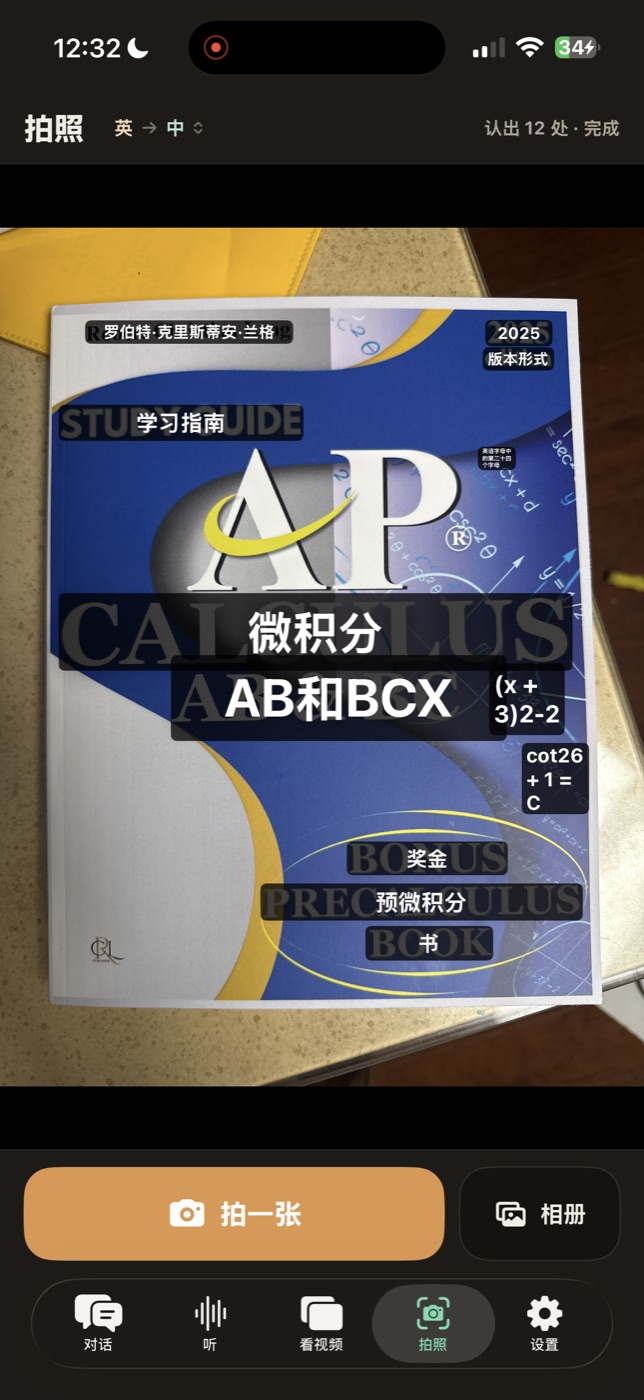
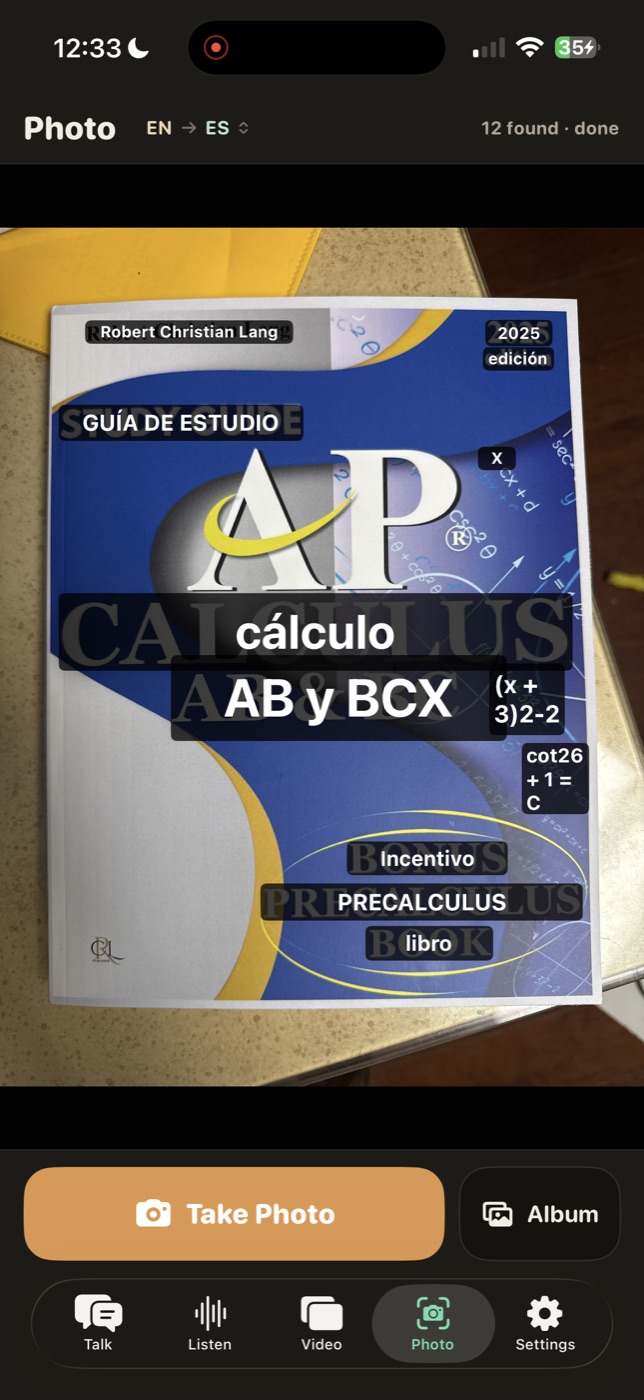
Read
Understand the signs on a foreign street 读懂异国街头的招牌 Entiende los letreros de una calle extranjera
And afterwards: Auto tidy-up & summary turns a Listen, Video or Photo session into a clean script with key points — offline, on your iPhone. Early access, included at no extra charge. 事后还有一手:自动整理与摘要把一场「听 / 看视频 / 拍照」理成干净的讲稿并附要点 —— 全程离线,在本机完成。试运行中,已包含在一次付清里,不额外收费。 Y después: Orden y resumen automáticos convierte una sesión de Escuchar, Vídeo o Foto en un guion limpio con puntos clave, sin conexión y en tu iPhone. Acceso anticipado, incluido sin coste extra.
Every word is processed on your iPhone — never uploaded, never stored, seen by no one. Not even us. No servers, no accounts, no analytics. 每个字都在本机处理,一个字不出手机,谁都看不到,包括我们。没有服务器、没有账号、没有数据统计。 Cada palabra se procesa en tu iPhone: nunca se sube, nunca se guarda, nadie la ve. Ni siquiera nosotros. Sin servidores, sin cuentas, sin estadísticas.
Try it in Airplane Mode 飞机模式可验证 Compruébalo en Modo AviónLive captions get you through the moment. But afterwards you're left with a wall of half-finished sentences. Auto tidy-up & summary fixes that — and no other fully-offline translator does it. 实时字幕能让你当场听懂。可事后回头看,剩下的往往是一堆半截话。自动整理与摘要就是来解决这件事的 —— 而且目前没有第二个完全离线的翻译 App 能做到。 Los subtítulos en vivo te salvan el momento. Pero después te queda un muro de frases a medias. Orden y resumen automáticos lo arregla, y ningún otro traductor totalmente sin conexión lo hace.
Every Listen, Video and Photo session is saved as a document you can reopen from history. Each document has five pages: 每一场「听」「看视频」「拍照」都会存成一份文稿,随时能从历史里打开。每份文稿有五页: Cada sesión de Escuchar, Vídeo y Foto se guarda como un documento que puedes reabrir desde el historial. Cada documento tiene cinco páginas:
- The conversation was about the preparation of products for the holidays, especially peanut candy and toffee. 这段对话在谈过节要准备的食品,特别是花生糖和太妃糖。 La conversación trataba sobre la preparación de productos para las fiestas, sobre todo el dulce de cacahuate y el toffee.
- The father, who is an expert, mentioned that the store only makes certain products to maintain quality and tradition. 父亲是这方面的行家,他提到店里只做某几样,为的是保住品质和老规矩。 El padre, que es un experto, mencionó que la tienda solo hace ciertos productos para mantener la calidad y la tradición.
- It was agreed that someone else would be in charge of making the peanut candy, since the father was busy with other projects. 大家说定由别人来做花生糖,因为父亲手上还忙着别的事。 Se acordó que otra persona se encargaría de hacer el dulce de cacahuate, ya que el padre estaba ocupado con otros proyectos.
Real output from an Español → English session — a family talking about holiday cooking. 这是一场 Español → English 实录的真实输出 —— 一家人在聊过节做什么吃的。 Salida real de una sesión Español → English: una familia hablando de la comida de las fiestas.
- ✓ Tidied — filler words (“um”, “uh”, 嗯, 那个), false starts and repeated words are removed, obvious speech-recognition slips are fixed, punctuation is added. It stays a script: line by line, speaker turns preserved. Nothing is rewritten into an essay. 整理稿 —— 去掉「嗯」「那个」「um」这类口水词、说了一半又重来的话和重复的字,修掉明显的识别错字,补上标点。它仍然是一份讲稿:一句一行,谁说的还是谁说的,绝不改写成一篇文章。 Ordenado: se quitan las muletillas («um», «eh», 嗯, 那个), los arranques en falso y las repeticiones, se corrigen errores obvios de reconocimiento y se añade puntuación. Sigue siendo un guion: línea a línea, con los turnos de cada persona. No se reescribe como un ensayo.
- ✓ Tidied tr. — the cleaned script is then re-translated as a whole. Far more accurate than the sentence-by-sentence live captions, because the translator finally sees the context: pronouns, tense, dropped subjects. 整理译文 —— 再把整理好的稿子整段重新翻译。比一句一句的实时字幕准得多,因为这次翻译终于看得到上下文:代词、时态、被省掉的主语。 Trad. ord.: el guion limpio se vuelve a traducir completo. Mucho más preciso que los subtítulos en vivo frase a frase, porque ahora sí hay contexto: pronombres, tiempos verbales, sujetos omitidos.
- ✓ Key points — a short bullet digest on top: what it was about, decisions, numbers, names, action items. The full script always stays intact below it. 要点 —— 上面附一小段摘要:讲了什么、定了什么、数字、人名、待办。完整脚本永远原样保留在下面。 Puntos clave: un resumen breve arriba — de qué se habló, decisiones, cifras, nombres, tareas. El guion completo se conserva intacto debajo.
- ✓ Export any page, a bilingual side-by-side, or all four in one .txt — through the normal iOS share sheet. 导出任意一页、双语对照,或者「全部导出(四份合一)」的一个 .txt —— 走 iOS 系统分享单。 Exporta cualquier página, la versión bilingüe o las cuatro en un solo .txt, mediante la hoja de compartir de iOS.
It all happens offline, on your iPhone — nothing is uploaded. Try it in Airplane Mode. The tidy-up, the key points and the re-translation are done by your iPhone's own on-device language model. No servers, no accounts — the same promise as the rest of the app. 全程离线,在这台 iPhone 上完成,不上传 —— 飞机模式下照样能用。整理、要点、重新翻译,靠的都是 iPhone 自带的端侧语言模型。没有服务器、没有账号 —— 和这个 App 其他部分的承诺完全一样。 Todo sin conexión, en tu iPhone: nada se sube. Pruébalo en Modo Avión. El orden, los puntos clave y la retraducción los hace el modelo de lenguaje local del propio iPhone. Sin servidores, sin cuentas: la misma promesa que el resto de la app.
Works in Airplane Mode too 飞机模式下照样能用 También funciona en Modo AviónEarly access — and included. It's part of the one-time $2.99 purchase: not a paid add-on, not a subscription. 试运行中 —— 已经包含在内。它属于 $2.99 一次付清的一部分:不是付费加购,也不是订阅。 Acceso anticipado, y va incluido. Forma parte de la compra única de $2.99: no es un extra de pago ni una suscripción.
Which iPhones? This one page needs the chip that runs Apple Intelligence, switched on in Settings → Apple Intelligence & Siri: iPhone 15 Pro and 15 Pro Max, and every iPhone 16 and iPhone 17 model. Not iPhone 15 / 15 Plus, and not iPhone 14 or older.
On those other iPhones nothing else changes — translation, live captions, video captions and photo all work exactly as usual, and so does every export. Only the tidy-up and key-points page is unavailable.
哪些 iPhone 能用?仅这一页需要能跑 Apple Intelligence 的芯片,并在「设置 → Apple Intelligence 与 Siri」里打开:iPhone 15 Pro、15 Pro Max,以及 iPhone 16、iPhone 17 全系。iPhone 15 / 15 Plus 和 iPhone 14 及更早机型不支持。
在这些机型上,其他一切照旧 —— 翻译、实时字幕、视频字幕、拍照全部正常使用,导出也一样。只是没有「整理与要点」这一页而已。
¿Qué iPhone? Solo esta página necesita el chip que ejecuta Apple Intelligence, activado en Ajustes → Apple Intelligence y Siri: iPhone 15 Pro y 15 Pro Max, y todos los modelos iPhone 16 e iPhone 17. No el iPhone 15 / 15 Plus, ni el iPhone 14 o anteriores.
En esos otros iPhone no cambia nada más: la traducción, los subtítulos en vivo, los subtítulos de vídeo y la foto funcionan igual que siempre, y las exportaciones también. Solo falta la página de orden y puntos clave.
See the steps in How to use → 到「使用教程」看具体步骤 → Ver los pasos en Cómo se usa →
Pay once — all your translation needs, unlocked. 一次付清,所有翻译所需,全部归你。 Paga una vez y todas tus necesidades de traducción quedan desbloqueadas.
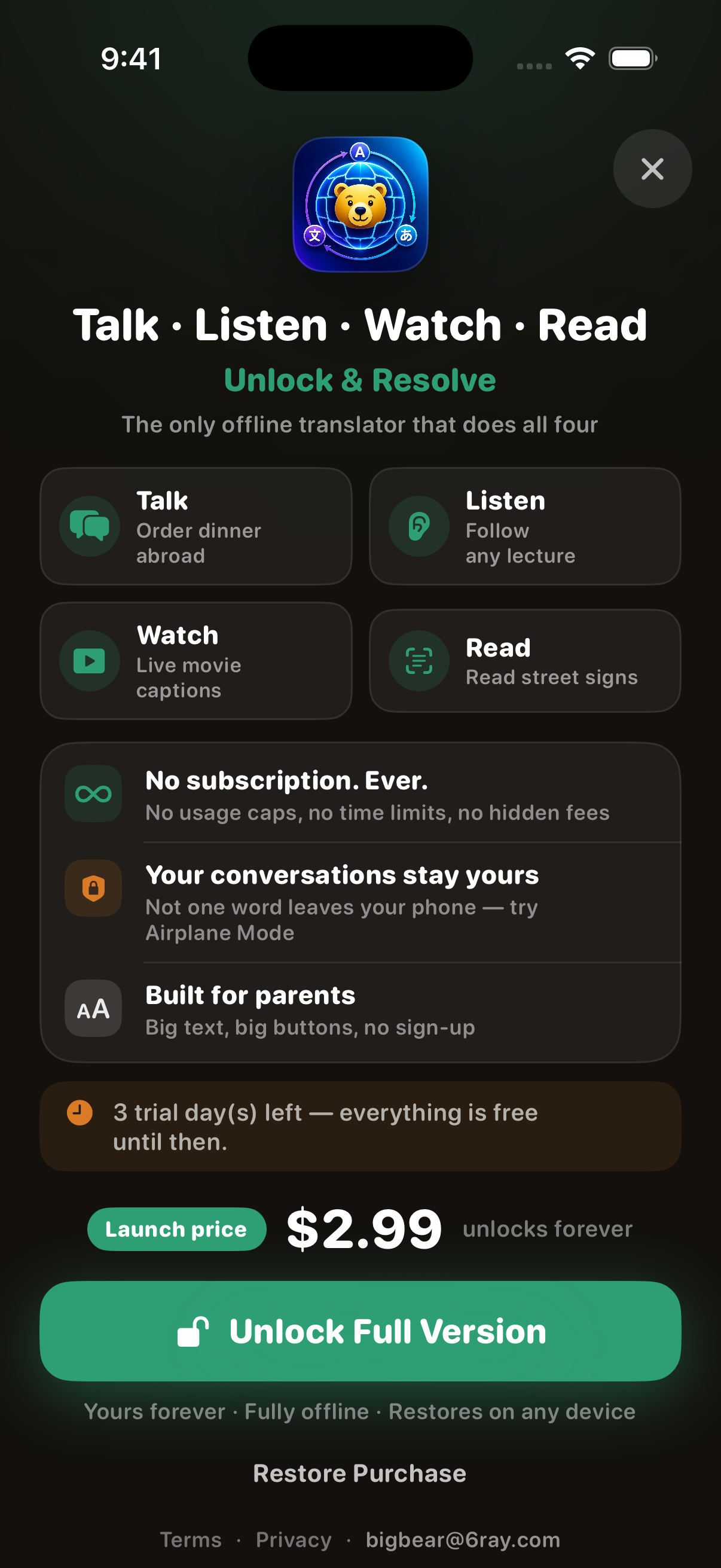
- ✓ 3-day free trial — everything unlocked from the first minute 3 天免费试用,全部功能从第一分钟就开放 3 días de prueba gratis con todo desbloqueado desde el primer minuto
- ✓ No subscription, no usage caps, no hidden fees 无订阅、无次数限制、无隐藏收费 Sin suscripción, sin límites de uso, sin cargos ocultos
- ✓ Auto tidy-up & summary is included too — early access, no extra charge 自动整理与摘要也一并包含 —— 试运行中,不额外收费 Orden y resumen automáticos también incluido: acceso anticipado, sin coste extra
- ✓ New iPhone? Tap “Restore Purchase” — free, forever 换新手机?点「恢复购买」即可找回,永久有效 ¿Teléfono nuevo? Toca «Restaurar compra» y listo
Install it for Mom and Dad — they'll actually use it. 装给爸妈 —— 他们真的会用。 Instálala para tus padres: de verdad la usarán.
- ✓ Big text, big buttons — one giant “Hold to Speak” button does the work 大字、大按钮 —— 一个巨大的「按住说话」按钮就够了 Letra grande y botones grandes: un solo botón «Mantén para hablar»
- ✓ No sign-up, no account, no password to forget 无需注册、没有账号、不用记密码 Sin registro, sin cuenta, sin contraseñas que olvidar
- ✓ Works fully offline — no SIM card, no roaming, no Wi-Fi needed abroad 完全离线可用 —— 出国不用流量卡、不用漫游、不用 Wi-Fi Funciona sin conexión: sin SIM, sin roaming, sin Wi-Fi en el extranjero
- ✓ Interface in English, 中文 and Español — it speaks their language too 界面支持中文、English、Español —— 界面也说他们的语言 Interfaz en español, inglés y chino
Requires iOS 26 or later — newer iPhones translate fastest, since everything runs on the phone itself. 需要 iOS 26 或更高版本 —— 翻译全在手机本机完成,机器越新越快。 Requiere iOS 26 o posterior; todo se ejecuta en el propio iPhone, y los más nuevos van más rápido.
How to use each feature 每个功能怎么用 Cómo usar cada función
Pick a feature. Steps use the real button names you'll see in the app. 选一个功能。步骤里写的都是 App 里真实的按钮名称。 Elige una función. Los pasos usan los nombres reales de los botones.
Talk对话Hablar
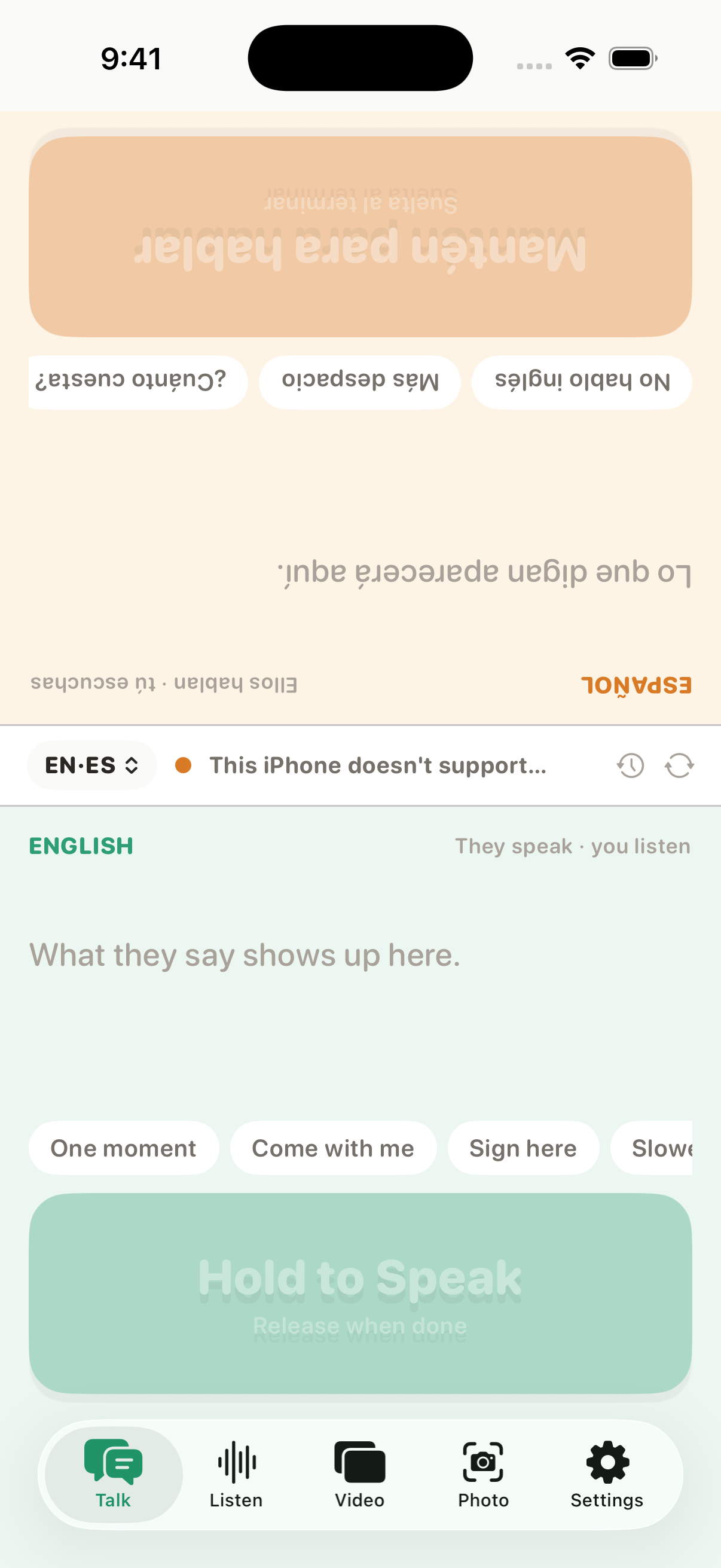
- Open the Talk tab. 打开 Talk(对话)标签页。 Abre la pestaña Talk.
- Check the direction pill in the middle bar (e.g. EN·ZH) — tap it to change languages. 看中间栏的方向按钮(如 EN·ZH)—— 点它可以换语言。 Revisa la píldora de dirección en la barra central (p. ej. EN·ZH); tócala para cambiar de idioma.
- Hold the big green Hold to Speak button, speak, and release when done. 按住大绿色的 按住说话 按钮,说完松开。 Mantén pulsado el gran botón verde Mantén para hablar, habla y suelta al terminar.
- The translation appears in the other pane — flipped so the person across the table can read it — and is spoken aloud. 译文出现在另一侧面板(上下颠倒,正好让对面的人看),并自动朗读出来。 La traducción aparece en el otro panel, girada para que la persona de enfrente la lea, y se pronuncia en voz alta.
- Tap a phrase chip for common lines (“One moment”, “Come with me”…). Press the + chip to save up to 3 custom phrases per language — they translate automatically. 点短语气泡可直接说常用句(「稍等」「跟我来」……)。点 + 气泡可为每种语言保存最多 3 条自定义短语,会自动翻译。 Toca una frase rápida («Un momento», «Ven conmigo»…). Con el chip + puedes guardar hasta 3 frases propias por idioma; se traducen solas.
Listen听Escuchar
- Open the Listen tab. 打开 Listen(听)标签页。 Abre la pestaña Listen.
- Pick your direction (which language is being spoken → which language you read). 选好方向(对方说什么语言 → 你想看什么语言)。 Elige la dirección (qué idioma se habla → en qué idioma quieres leer).
- Tap start — live captions of the speech around you appear, with the translation right below. 点开始 —— 周围的讲话会实时变成字幕,译文就在下方。 Toca iniciar: aparecen subtítulos en vivo de lo que se habla a tu alrededor, con la traducción debajo.
- Match the speaker's pace with the speed setting: Quick / Normal / Slow. 按讲话人的语速选择:快嘴 / 标准 / 慢速。 Ajusta el ritmo del hablante: Rápido / Normal / Lento.
Great for: lectures, tours, sermons, announcements — anywhere someone talks and you want to follow along. 适合:讲座、导游讲解、致辞、广播 —— 任何「别人在讲、你想听懂」的场合。 Ideal para: charlas, visitas guiadas, anuncios: donde alguien habla y quieres seguirlo.
Afterwards: Auto tidy-up & summary 听完之后:自动整理与摘要 Después: Orden y resumen automáticos
Every “start → stop” is saved as one session — the last 10 stay on your phone. Same steps for Video and Photo sessions. 一次「开始 → 停止」记为一场,本机保留最近 10 场。看视频、拍照的记录,步骤完全一样。 Cada «iniciar → parar» se guarda como una sesión; se conservan las 10 últimas en el teléfono. Los mismos pasos valen para Vídeo y Foto.
- After you stop, open the history list and tap the session you want. 停止之后,打开历史记录列表,点开你要的那一场。 Cuando pares, abre el historial y toca la sesión que quieras.
- The session opens as a document with five pages: Original · Translation · Tidied · Tidied tr. · Actions. 这一场会以文稿形式打开,共五页:原文 · 译文 · 整理稿 · 整理译文 · 操作。 La sesión se abre como un documento de cinco páginas: Original · Traducción · Ordenado · Trad. ord. · Acciones.
- Go to Actions and tap Tidy it up. It cleans the transcript into a script, pulls out the key points, then re-translates the whole thing. 切到 操作 页,点 开始整理。它会把实录理成通顺的脚本、提炼要点,再整段重新翻译。 Ve a Acciones y toca Ordenar. Limpia la transcripción, extrae los puntos clave y vuelve a traducirlo todo.
- Long session? It handles 5 parts per tap — just tap Tidy more until it says all parts are done. Not happy with the result? Redo tidy-up runs it again; your original recording transcript is never touched. 录得比较长?它每次处理 5 段 —— 继续点 继续整理,直到提示「整场已整理完」。结果不满意?点 重新整理 再跑一遍;原始实录一个字都不会动。 ¿Sesión larga? Procesa 5 partes por toque: sigue tocando Continuar hasta que diga que está todo listo. ¿No te convence? Rehacer lo repite; la transcripción original nunca se toca.
- Read Tidied and Tidied tr. — key points sit on top, the full script right below. Then copy or export from Actions: any page, Bilingual side-by-side, or Export everything — all four in one .txt through the share sheet. 看 整理稿 和 整理译文 —— 要点在最上面,完整脚本紧跟在下面。然后回 操作 页复制或导出:任意一页、双语对照,或者 全部导出(四份合一) 一个 .txt,走系统分享单。 Lee Ordenado y Trad. ord.: los puntos clave arriba y el guion completo debajo. Luego copia o exporta desde Acciones: cualquier página, Bilingüe o Exportar todo — las cuatro en un .txt por la hoja de compartir.
Good to know: it all happens offline, on your iPhone — nothing is uploaded. Each part waits at most 30 seconds; if one takes longer, that part simply keeps the original text. Nothing is lost. 小提示:全程离线,在这台 iPhone 上完成,不上传。每段最多等 30 秒,某段超时就原样保留原文,不会丢东西。 Ten en cuenta: todo ocurre sin conexión, en tu iPhone; nada se sube. Cada parte espera 30 segundos como máximo; si una tarda más, conserva el texto original. No se pierde nada.
Which iPhones? This page needs Apple Intelligence (Settings → Apple Intelligence & Siri): iPhone 15 Pro / 15 Pro Max and every iPhone 16 and 17 model — not iPhone 15 / 15 Plus, not iPhone 14 or older. On those, translation, live captions, video captions and photo all work exactly as usual, exports included; only this one page is missing. More in the FAQ. 哪些 iPhone 能用?这一页需要 Apple Intelligence(设置 → Apple Intelligence 与 Siri):iPhone 15 Pro / 15 Pro Max,以及 iPhone 16、17 全系 —— iPhone 15 / 15 Plus 和 iPhone 14 及更早不支持。在这些机型上,翻译、实时字幕、视频字幕、拍照全部照常使用,导出也一样,只是少了这一页。详见常见问题。 ¿Qué iPhone? Esta página necesita Apple Intelligence (Ajustes → Apple Intelligence y Siri): iPhone 15 Pro / 15 Pro Max y todos los iPhone 16 y 17; no el iPhone 15 / 15 Plus ni el iPhone 14 o anteriores. En esos, la traducción, los subtítulos en vivo, los de vídeo y la foto funcionan igual que siempre, exportaciones incluidas; solo falta esta página. Más en las preguntas.
Video看视频Vídeo
- Open the Video tab and tap the start button. iOS shows the Screen Broadcast sheet — choose BigBear Captions and tap Start Broadcast. 打开 Video(看视频)标签页,点开始按钮。iOS 会弹出「屏幕直播」面板 —— 选择 大熊翻译字幕,再点 开始直播。 Abre la pestaña Video y toca iniciar. iOS mostrará la hoja de retransmisión de pantalla: elige BigBear Captions y toca Iniciar retransmisión.
- A floating caption window appears. Now switch to any video app — YouTube, TikTok, streaming, online lessons. 屏幕上会出现一个悬浮字幕小窗。现在切换到任何视频 App —— YouTube、抖音、流媒体、网课都行。 Aparece una ventana flotante de subtítulos. Cambia a cualquier app de vídeo: YouTube, TikTok, streaming, clases.
- Captions and their translation float over the video in real time. 字幕和译文会实时浮在视频上方。 Los subtítulos y su traducción flotan sobre el vídeo en tiempo real.
- To stop: tap Stop in the app, or tap the red recording indicator in the status bar. It also stops by itself after 1 minute of silence. 停止:回到 App 点 停止,或点状态栏上的红色录制指示。静音 1 分钟后也会自动停止。 Para parar: toca Stop en la app o el indicador rojo de grabación en la barra de estado. También se detiene solo tras 1 minuto de silencio.
Normal to see: iOS shows a purple/red broadcast indicator while captions run — that's the system telling you a broadcast is active, and it's expected. 正常现象:字幕运行时,iOS 会显示紫色/红色的直播指示 —— 这是系统在提示「屏幕直播进行中」,属于正常。 Es normal: iOS muestra un indicador morado/rojo mientras los subtítulos funcionan; es el aviso del sistema y es esperado.
Photo拍照Foto
- Open the Photo tab. 打开 Photo(拍照)标签页。 Abre la pestaña Photo.
- Point the camera at a menu, sign or label, and snap. 把相机对准菜单、路牌或标签,拍一张。 Apunta la cámara a un menú, letrero o etiqueta y toma la foto.
- The recognized text is translated on the spot. 识别出的文字当场翻译。 El texto reconocido se traduce al instante.
First-run setup 首次设置 Primera configuración
- Download language packs: Settings → Packs, tap the download button next to each direction you need. Details in the FAQ. 下载语言包:Settings → Packs(语言包),在需要的方向旁点下载按钮。详见常见问题。 Descarga los paquetes de idioma: Settings → Packs, toca el botón de descarga junto a cada dirección. Detalles en las preguntas.
- Add clearer voices (optional but recommended): Settings → Voices. Step-by-step in the FAQ. 添加更清晰的发音(可选但推荐):Settings → Voices(发音)。步骤见常见问题。 Añade voces más claras (opcional pero recomendado): Settings → Voices. Pasos en las preguntas.
- Done — after that, everything works with no internet at all. 完成 —— 之后一切功能都完全不需要网络。 Listo: a partir de ahí, todo funciona sin internet.
Frequently asked questions 常见问题 Preguntas frecuentes
Go to Settings → Packs. Each translation direction is a separate download — tap the download button next to each one you need. You'll need internet just this once (Wi-Fi recommended), and keep the app in the foreground while downloading. After that, everything runs offline. 打开 Settings → Packs(语言包)。每个翻译方向是一个单独的下载 —— 在需要的方向旁点下载按钮。只有这一次需要联网(建议用 Wi-Fi),下载时请让 App 保持在前台。之后一切都离线运行。 Ve a Settings → Packs. Cada dirección de traducción es una descarga aparte: toca el botón de descarga junto a las que necesites. Solo necesitas internet esta vez (mejor Wi-Fi) y mantén la app en primer plano mientras descarga. Después, todo funciona sin conexión.
Go to Settings → Voices — each language has a dropdown. Tap Add voices (open Settings): it jumps to iOS Settings → Accessibility → Spoken Content → Voices. Download an Enhanced or Premium voice for your language, then come back, pick it in the dropdown, and tap Play to preview. 打开 Settings → Voices(发音)—— 每种语言有一个下拉菜单。点 添加发音(打开设置),会跳到 iOS 设置 → 辅助功能 → 朗读内容 → 声音;为你的语言下载一个「较清晰/高清」的声音,然后回到 App,在下拉菜单里选中它,点 试听 预览。 Ve a Settings → Voices: cada idioma tiene un menú. Toca Añadir voces (abrir Ajustes); te lleva a Ajustes de iOS → Accesibilidad → Contenido hablado → Voces. Descarga una voz Mejorada o Premium para tu idioma, vuelve a la app, elígela en el menú y toca Reproducir para probarla.
Yes — turn on Airplane Mode and try it. Speech recognition, translation and voices all run on-device. That's also why your conversations are private: nothing ever leaves your phone. 真的 —— 打开飞机模式试试就知道。语音识别、翻译、发音全部在手机本机运行。这也是你的对话保持私密的原因:任何内容都不会离开手机。 Sí: activa el Modo Avión y pruébalo. El reconocimiento de voz, la traducción y las voces funcionan en el dispositivo. Por eso tus conversaciones son privadas: nada sale de tu teléfono.
Every Listen, Video and Photo session is saved as a document with five pages: Original, Translation, Tidied, Tidied tr. and Actions. Open a session from history, go to Actions and tap Tidy it up. 每一场「听 / 看视频 / 拍照」都会存成一份文稿,共五页:原文、译文、整理稿、整理译文、操作。从历史里打开一场,切到 操作 页,点 开始整理 即可。 Cada sesión de Escuchar, Vídeo y Foto se guarda como un documento de cinco páginas: Original, Traducción, Ordenado, Trad. ord. y Acciones. Abre una sesión desde el historial, ve a Acciones y toca Ordenar.
It cleans the raw transcript into a readable script — filler words, false starts and repeated words removed, obvious speech-recognition slips fixed, punctuation added, speaker turns kept line by line. It then re-translates that cleaned script as a whole, which is far more accurate than the sentence-by-sentence live captions, because the translator finally has context. On top it adds Key points: a short bullet digest of what was said — decisions, numbers, names, action items. The full script always stays intact below it. 它把原始实录理成一份读得下去的脚本 —— 去掉口水词、说一半重来的话和重复的字,修掉明显的识别错字,补上标点,一句一行保留说话轮次。然后把整理好的稿子整段重新翻译,比一句一句的实时字幕准得多,因为这一次翻译看得到上下文。最上面还会附一段要点:讲了什么、定了什么、数字、人名、待办。完整脚本永远原样保留在下面。 Convierte la transcripción en bruto en un guion legible: sin muletillas, arranques en falso ni repeticiones, con los errores obvios de reconocimiento corregidos, puntuación añadida y los turnos de cada persona línea a línea. Después vuelve a traducir ese guion completo, mucho más preciso que los subtítulos en vivo frase a frase, porque ahora hay contexto. Arriba añade Puntos clave: un resumen de lo dicho — decisiones, cifras, nombres, tareas. El guion completo se conserva intacto debajo.
It all happens offline, on your iPhone — nothing is uploaded. Try it in Airplane Mode. The work is done by your iPhone's own on-device language model, so it keeps exactly the same privacy promise as the rest of the app. 全程离线,在这台 iPhone 上完成,不上传 —— 飞机模式下照样能用。干活的是 iPhone 自带的端侧语言模型,所以隐私承诺和 App 其他部分完全一致。 Todo ocurre sin conexión, en tu iPhone: nada se sube. Pruébalo en Modo Avión. Lo hace el modelo de lenguaje local del propio iPhone, así que mantiene la misma promesa de privacidad que el resto de la app.
It's early access, and it's included — part of the one-time $2.99 purchase. Not a paid add-on, not a subscription. 目前是试运行,而且已经包含在内 —— 属于 $2.99 一次付清的一部分。不是付费加购,也不是订阅。 Es acceso anticipado y va incluido: forma parte de la compra única de $2.99. No es un extra de pago ni una suscripción.
Which iPhones? This one page needs the chip that runs Apple Intelligence, turned on in Settings → Apple Intelligence & Siri — that means iPhone 15 Pro, iPhone 15 Pro Max, and every iPhone 16 and iPhone 17 model. It is not available on iPhone 15 / 15 Plus, or on iPhone 14 and older. 哪些 iPhone 能用?仅这一页需要能跑 Apple Intelligence 的芯片,并在「设置 → Apple Intelligence 与 Siri」里打开 —— 也就是 iPhone 15 Pro、iPhone 15 Pro Max,以及 iPhone 16、iPhone 17 全系。iPhone 15 / 15 Plus 以及 iPhone 14 及更早机型不支持。 ¿Qué iPhone? Solo esta página necesita el chip que ejecuta Apple Intelligence, activado en Ajustes → Apple Intelligence y Siri: iPhone 15 Pro, iPhone 15 Pro Max y todos los modelos iPhone 16 e iPhone 17. No está disponible en iPhone 15 / 15 Plus ni en iPhone 14 o anteriores.
If your iPhone isn't on that list, nothing else is missing: translation, live captions, video captions and photo all work exactly as usual, and so do copy and export. Only the tidy-up and key-points page is unavailable. 如果你的 iPhone 不在这个名单里,其他什么都不缺:翻译、实时字幕、视频字幕、拍照全部照常使用,复制和导出也一样。只是没有「整理与要点」这一页。 Si tu iPhone no está en esa lista, no te falta nada más: la traducción, los subtítulos en vivo, los de vídeo y la foto funcionan igual que siempre, y también copiar y exportar. Solo falta la página de orden y puntos clave.
You get a 3-day free trial with everything unlocked. After that, a one-time $2.99 purchase unlocks all four features forever. No subscription. On a new phone, tap Restore Purchase to get it back for free. 前 3 天免费试用,全部功能开放。之后一次性支付 $2.99,即可永久解锁全部四大功能。没有订阅。换新手机时,点 恢复购买 免费找回。 Tienes 3 días de prueba con todo desbloqueado. Después, una compra única de $2.99 desbloquea las cuatro funciones para siempre. Sin suscripción. En un teléfono nuevo, toca Restaurar compra.
The first check after a phone reboot can take a moment — it's verifying the on-device packs. Subsequent launches are fast. 手机重启后的第一次检查会稍慢一点 —— 它在校验本机的语言包。之后每次启动都很快。 La primera comprobación tras reiniciar el teléfono puede tardar un momento: está verificando los paquetes locales. Los siguientes arranques son rápidos.
English ⇄ 中文 and English ⇄ Español, both ways. The app's interface is available in English, 中文 and Español. English ⇄ 中文、English ⇄ Español,均为双向互译。App 界面支持中文、English、Español 三种语言。 Inglés ⇄ chino e inglés ⇄ español, en ambos sentidos. La interfaz está en español, inglés y chino.
More languages on the way. 更多语言正在路上。 Más idiomas en camino.
iOS 26 or later. Everything runs on the phone itself, so newer iPhones translate fastest. iOS 26 或更高版本。翻译全在手机本机完成,机器越新越快。 iOS 26 o posterior. Todo se ejecuta en el iPhone; los más nuevos van más rápido.
Talk, Listen, Watch and Read work on every iPhone running iOS 26. Only Auto tidy-up & summary needs a newer model — iPhone 15 Pro / 15 Pro Max and every iPhone 16 and 17. 「说、听、看、读」四大功能在所有能跑 iOS 26 的 iPhone 上都可用。只有自动整理与摘要需要较新的机型 —— iPhone 15 Pro / 15 Pro Max 以及 iPhone 16、17 全系。 Hablar, Escuchar, Ver y Leer funcionan en cualquier iPhone con iOS 26. Solo Orden y resumen automáticos requiere un modelo más nuevo: iPhone 15 Pro / 15 Pro Max y todos los iPhone 16 y 17.
The broadcast auto-stops after 1 minute with no audio, to save battery. Just start it again from the Video tab. 为了省电,静音 1 分钟后直播会自动停止。回到 Video 标签页再点一次开始即可。 La retransmisión se detiene tras 1 minuto sin audio para ahorrar batería. Vuelve a iniciarla desde la pestaña Video.
Email us at bigbear@6ray.com — we read every message. 发邮件到 bigbear@6ray.com —— 每封邮件我们都会看。 Escríbenos a bigbear@6ray.com; leemos todos los mensajes.